Maybe it’s because I obsess constantly about mine, but I wish we talked more about our professional workspaces. We share pictures of them on occasion—almost always campus offices, almost always shared on the first day of a new job, or a move to a new office, or a promotion or some other cause for redecorating—but mostly, they’re treated like settings, silently featuring in the background of an office selfie. And we almost never talk about the expense.
Due to decades of chronic pain and extensive online teaching, I think a lot about my workspaces, both on campus and at home. Especially at home, actually. I’m always rotating between 3 different workspaces: my bed, my living room (which has a mid-century desk setup and a standing desk setup for my sofa), and my primary desk setup in my bedroom.
What can I say, I live in a NYC apartment where indoor real estate is at a premium; every bit of space has to count.
Because my pain has been steadily worsening for the past 3 years, and because so much of it has felt connected to the position of my cervical spine, I finally decided to go for broke (literally, as recounted below) and upgrade my bedroom battlestation. This entailed tucking my beautiful old mid-century desk into a corner of my living room, buying a whole lot of expensive shit with ergonomic and eye care benefits, breaking my body assembling it all, and then finally, finally, settling down to enjoy the fruits of my labor. And cry over my credit card.
The process was worth it, but the price tag isn’t for the faint of heart. Frankly, I put myself in brief credit card debt over it, because my body required specific brands and didn’t give a damn about price tags. I never would have been able to afford it as an adjunct or grad student, back in 2006 when I became disabled and would have benefited most from a god-tier battlestation perfectly tailored to my access needs.
Academics eagerly flatten us all into middle- and upper-middle-class, but we aren’t all socioeconomically the same. I started my teaching career on a $21,000 salary in NYC. On $78,000 on the tenure-track, after living and medical costs, I’d still be paycheck to paycheck. It’s the money from Appa’s life insurance that’s given me a safety net, and I can’t overstate how conflicted I feel about that.
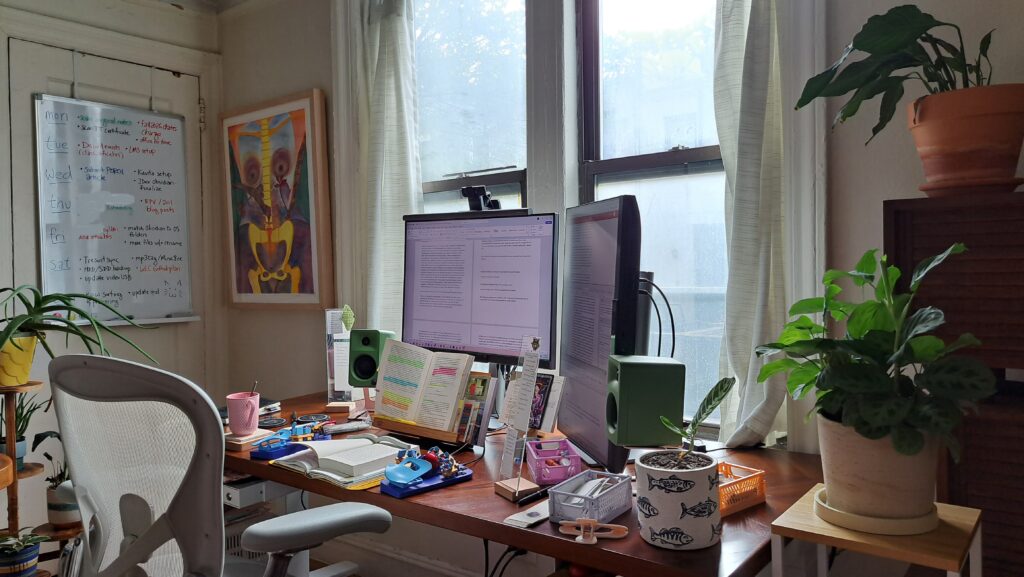
Knowing what brands and products to look for can help with either hunting down variants or dupes that work for you, and/or deciding whether or not to go for broke when literally broke. The product guide I’m including at the end of this post is meant to make all that explicit and facilitate the (disabled) shopping experience particularly. After all, the “disability tax”—i.e., that disabled people have to spend more to achieve the same quality of life as nondisabled people—is all over this product guide, and my life, in a very real, very grim way.
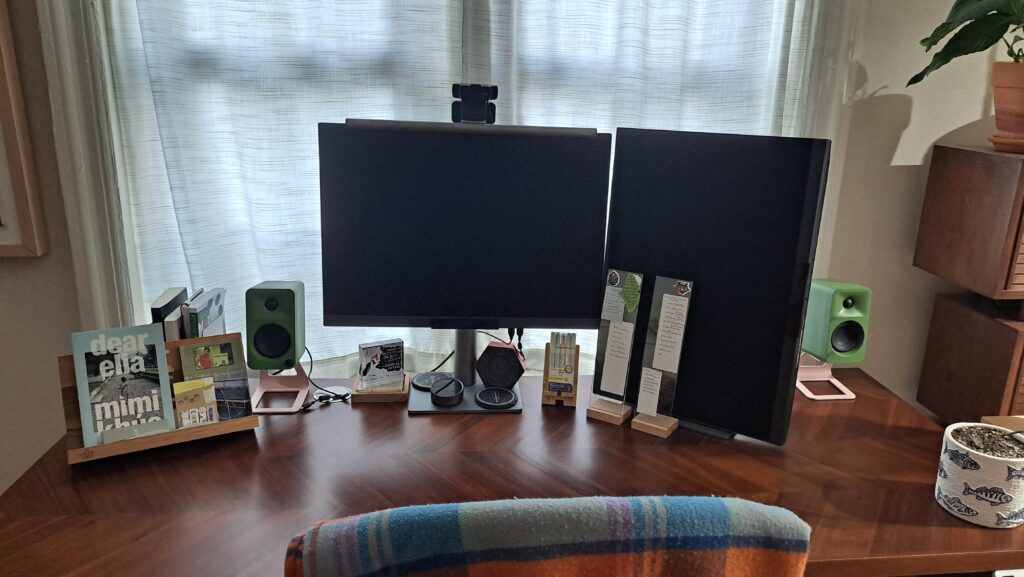
You can see from the photos that I habitually clutter my desk as soon as I start using it and declutter it at the end of my work day (or whenever I cycle out to a different workspace). Brain fog means I have to be organized, stay organized, and stick to some sort of organizational routine—even one that gets fucked up by flare-ups now and again—or my precariously balanced academic life doesn’t stand a chance.
I also try to clean out my whole workspace at least once a year, from drawers and storage crates to surfaces, but that sort of depends on what chronic pain allows. Also, I have a formidable stationery addiction problem. So I aspire to striking a balance between minimalism and maximalism—keeping both essentials and inessentials that “spark joy”: i.e., the Hay crates under my desk that are full of varieties of sticky notes, pens, pencils, markers, stickers, stamps, etc. My compromise is this: If something doesn’t work for me, or doesn’t work for me anymore, I get rid of it. Like trading Sharpie highlighters for Zebra JustFit Mojini highlighters, or BIC pens for Pilot Hi-Tec-C Coletos, or Traveler’s Company notebooks for Jiyu and Stalogy Editor’s series notebooks… you get the idea.
I surround myself with art made by myself and my very talented friends. To the left of my windows hangs a large watercolor that my longtime friend, photographer, and bodyworker Sara Fuller painted for my dissertation. An orange-and-red abstract acrylic on canvas that I painted hangs next to the closet door where I hung my whiteboard. On the right side of the desk hangs a painting by my longtime friend and literary agent Mary Krienke. Also pictured are several houseplants I’ve managed to keep alive: a couple of prayer plants and peace lilies, an aloe, a hoya, and an unbraided cylindrical snake plant. There are a lot more not pictured here. It’s nice to focus my eyes on artwork and greenery when my computer monitors remind me to take an eye care break.
Apart from my art, plants, Faribault Mill wool throw blanket, and not-pictured stationery (which I’ve written about elsewhere), the rest of what’s pictured is purchasable. Below is a list of all the work-related products on and around my desk, links to purchase (mostly Amazon, JetPens, and company websites), cost at time of purchase, and brief descriptions of how I use them and why they work for my specific purposes and access needs.
Product Guide
To drive home the point about the disability tax, my pre-tax, pre-deductions, pre-healthcare salary is $78,000. I live in Manhattan, i.e. a high cost of living area. I’m paid biweekly. I’m almost never able to contribute substantially to a savings account. One paycheck goes entirely to rent and utilities. Half the other paycheck goes to the month’s groceries. My “extra” money each month is usually between $500-$800 if I’m having an extremely frugal, healthy month; if I have more healthcare maintenance visits, or my cat has a crisis, then I just roll my credit card debt over until I can pay it in full.
And this is me on $78K, still in disbelief that I even have a chance each month to comfortably spend on recreation, to not do intermittent fasting to save a buck, to better absorb cat crises, electronics BSODs, takeout, the rising cost of living. Imagine what it was like stretching $21K for two years when I first moved here and became disabled (thanks again for the poverty wages, Columbia).
I’ve organized these items by purpose and spatial organization and have tallied up full expenses per-section and in total.
Electronics and Peripherals
- BenQ Programming Monitor RD280UG x2 ($700 ea): I run a dual monitor setup hooked up to my primary laptop (the one that moves room to room with me) or an older laptop that lives on this desk. I already own BenQ eye care products so upgrading to these monitors seemed like an obvious choice, plus I was intrigued by their odd 3:2 coding-specific ratio. There’s a number of preset color/dimness modes and a number of ways to customize it too.
- BenQ Screenbar Halo 2 ($199): This felt like a splurge, but BenQ sets a high standard for eye care, and between astigmatism, nearsightedness, and visual snow syndrome, my eyes are fucked. So I’m pleased to report that this screenbar is fantastic for my fucked-up eyes. It’s rechargeable, has front- and back-lighting modes that can be operated individually or in tandem, vastly reduces glare from screens, my own glasses, and other reflective surfaces, all while providing focused light at whatever brightness and temperature I need. It’s a massive improvement over my ceiling light and the standard task lamp I was using before. No regrets.
- Logitech C920e Webcam ($70): I needed a new external webcam back in 2020 when COVID-19 was sweeping NYC and settled on this one. It may not be the newest model, but the video quality is strong enough for live-streaming and recording, and the price was decent.
- Samson Q2U Microphone and Pop Filter ($90): Not pictured but worth mentioning since they often live on my desk. My Logitech webcam has a microphone, but I needed a higher-quality one for online teaching, Zoom meetings, and Discord voice chat. Both the mic and pop filter slide nicely into one of my desk drawers when not in use.
- Svalboard Keyboard, Prebuilt in Custom Colors: ($1400): Holy shit was this expensive and do I wish I’d had the money to buy it years ago. Designed to be operated with minimal wrist, arm, and shoulder motion, the Svalboard is a customizable layered keyboard that pays homage to the Microsoft Datahand of the 1990s. Each fingertip rests in the middle of a soft-touch 5-key cluster (with layers, this adds up to a lot of outputs), each positioned to reduce finger travel distance while preserving muscle memory. I never got off QWERTY so I’ve continued with that sort-of-QWERTY layout, and honestly? The learning curve isn’t as steep as you’d think. I bought this preassembled with custom colors. I have a soldering kit and technically could have built it myself, but my as-of-yet undiagnosed and progressive symptoms have left me with increasingly shaky hands. I figured the extra expenditure was worth the peace of mind.
- I switch keyboards a lot, so honorable mentions go to: the Lily58 Choc ($170 not pictured and not this exact model) wireless split keyboard that I use in tandem with the Ploopy Adept ($109, not pictured); I also use a wired TEX Shura ($189, not pictured) with Cherry MX keys, sometimes at the desk and exclusively when working in bed.
- Govee Tree Lamp ($145, not pictured): I detest my prewar ceiling boob lights—due to visual snow syndrome, I prefer a soft white overhead light supplemented by other forms of lighting, but LED bulbs run too hot in there, and CFLs and incandescent bulbs come off pretty yellow. So I complement my focused BenQ screenbar with a Govee Tree Floor Lamp with 3 rotatable heads (2 angled to serve as uplighting, 1 angled down and more towards the desk) for ambient light. It comes with a ton of preset static or dynamic mood lighting, has work-specific settings like “White Light” or “Reading,” has a dimming function, and—for bedtime reading sessions or slow mornings—can be set on a timer and/or scheduled to turn off or on at specific times.
TOTAL COST FOR ELECTRONICS AND PERIPHERALS: $3,772.00
Desk Stuff
- Uplift V3 2-Leg Electric Standing Desk ($1,811 for a 72×30 acacia desktop with other specific configurations): While the acacia wood desktop does leave something to be desired—cracks in its surface started appearing very quickly—the build is extremely heavy and solid, and it does what I need it to do. Anticipating disability problems and storage issues, I made sure to get casters, added two drawers with compartments for laptop storage and peripherals, and mounted surge protectors on the back. The electric motor is smooth, I can save preset heights, and it rolls easily on its casters when I need to clean around it. Also, I have the luxury of a large bedroom with enough space for a desk
- Herman Miller Aeron Chair ($1,871): I spent a week wandering NYC and testing various office chairs before settling on this one. I’m petite and disabled and require a chair that adjusts a great deal, and the Aeron is the gold standard for a reason. Mine has adjustable seat height, seat tilt that can be locked or unlocked, armrest height, armrest angle, and lumbar support. Felt like a splurge, paid for itself.
- Hay Crates, Medium x5 ($13) with casters ($30) and lids ($30): As part of my mission to keep my desktop surface as clear as possible, I needed extra storage close at hand, so I bought a few modular stacking recycled plastic crates with metal lids and locking casters. I can fit a stack of 2 under the right drawer and 3 under the left one, and I store my Svalboard, USB cables, backup drives, stationery supplies, and neck braces in them for easy retrieval.
- Acacia Cookbook Stand and Phone Stand ($30): This stand holds open any books I’m reading or quoting from while typing or at my desk, and I can’t believe it took me this long to buy something like this.
- Kanto OraMN Speakers and Kanto SE2 Speaker Stands ($390): I’m not an audiophile, but I dabble, and since those progressive symptoms appear to include worsening tinnitus of the eeeee and pulsatile varieties, I figured I’d up my speaker game too. I moved my old Pebble V3s to the living room desk and splurged on these Kanto Oras, which have 3 inputs via USB-C, Bluetooth, and RCA, have extremely accurate tonality, and work well even when acoustic conditions are less than ideal.
- Muji Steel Book Dividers ($8): Damn I love Muji. I also love keeping”bibliographic altars”: what Ann Cvetkovich has called assemblages of sources and objects that sustained her through depression and helped her keep writing. My baseline is depressed and pained, so I think of these ever-changing altars as “pulls” for my research, mental health, and creativity, assembled by occasionally browsing my shelves and picking books that “feel” right for whatever project or stage of life I’m in.
- Monitor Memo Board ($13): I don’t like sticking things to my monitors, especially when I’m prone to changing their orientation, but I also like repeating and/or breaking down my tasks across “at a glance” systems. I’ve designated a theme per side, visually indicated to me via Hades 1 keepsake stickers. (If you’re curious: Athena’s Owl Pendant for teaching; Dionysus’ Overflowing Cup for research; Chaos’ Cosmic Egg for organizational tasks pertaining to life and digital admin; and Skelly’s Lucky Tooth for healthcare).
- Cozy Coffee Coaster ($19): This stone coaster can be heated and is supposed to keep your coffee warm. I’m not sure it’s that effective, but it is cozy looking and does visually signal “coffee goes here” at a glance.
- Hades Coasters ($14): I try to invest in things I’ll enjoy and want to look at all day. I’m in love with the Hades game franchise (sharp eyes might spot the Zagreus and Megaera charms on my analog notebooks), and I tend to double-fist my drinks, so I keep two Hades coasters engraved with the Ares and Demeter boon symbols on my desk as well.
TOTAL COST FOR DESK STUFF: $4,281.00
Whiteboard Stuff
- Maxtek Magnetic Whiteboard plus Magnetic Shelf for Whiteboard ($60): I don’t have the wall real estate for multiple whiteboards, so I consolidate all my important tasks for the week, mostly work-related, on one vertical whiteboard hung over my closet door in my bedroom. I didn’t like the marker tray it came with, so I shelled out for a magnetic shelf to hold my dry erase markers.
- Pilot Board Master Dry Erase Markers, Medium Round Tip ($12): I’m strict about my transferable color-coding schema, so I have these refillable dry erase markers in black, blue, red, orange, and green. I might have grown up on Expo but these markers use vivid, alcohol-based ink that’s easy to read at a distance, erase completely without water or cleaner, and create minimal dust.
- Raymay Peelable Whiteboard Eraser ($4): A 10-layer peelable eraser for maximal lifespan.
TOTAL COST FOR WHITEBOARD STUFF: $76.00
Stationery Stuff
- Zebra JustFit MojiniLine ($6): Smudge-free highlighters for the win!
- Tsuki no Iro Translucent Notes ($11): I use this Hobonichi accessory to flag specific pages in books I’m reading, color-coding them as closely to my highlighting annotation system as possible.
- Stalogy To Do Medium Sticky Notes ($10): You may remember from my other posts that it helps me to repeat my task lists across my analog and digital systems. These fully-sticky to-do list notes fit nicely on my clear memo boards, affording me an at-a-glance view of various tasks.
- Appree Leaf Sticky Memo ($7): What can I say, it’s an adorable post-it note in the shape of a green Ginkgo leaf. I couldn’t resist. It’s not as sticky as I’d like it to be, but it is cute.
- Traveler’s Notebook, A5 Slim in Blue ($60 for cover only): The leather cover for my planner-oriented modular analog system. The Traveler’s Company system uses elastic bands to loop multiple notebooks together. I keep three in here: a weekly notebook, a monthly notebook, and a grid notebook.
- Roterfaden Journal, A5 in Blue ($200 for cover only): The leather cover for my work-oriented modular analog system. The Roterfaden system uses steel hinged clips to hold 3 notebooks. I keep a daily planner/”everything” notebook, a meeting notes log, and a project planner notebook in here.
TOTAL COST FOR (PICTURED) STATIONERY STUFF: $294.00
And now for the sticker shock: The total cost of everything listed above comes to $8,423.00. Excuse me while I go find a fainting couch.
But hopefully, something in this list—a product, a price tag, the material workings of an organizational system—helps you figure something out about your own access needs and how you might affordably accommodate them, item by item and dollar by dollar. And hopefully, this encourages more academics to speak plainly about not just what they own that works for them, but how much these things cost, and how they’re able to afford it.